Put the guidance into practice: open the related free tool. Examples use stated inputs and are not measured performance claims.
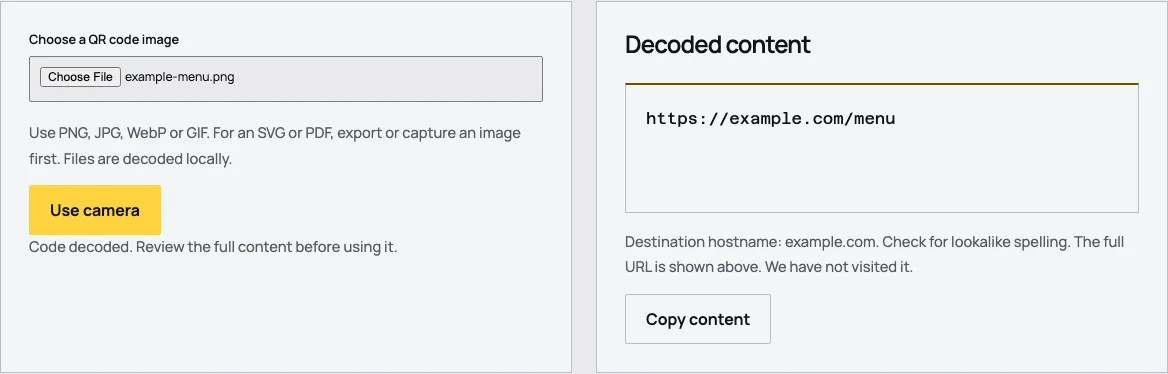
| Step | What happens | What it does not prove |
|---|---|---|
| Select image | Browser reads the local file | The destination is trustworthy |
| Decode | Reader reconstructs the payload | Every scanner supports its action |
| Inspect | Full content is displayed | A website is currently available |
| Act deliberately | You choose the next step | A scan authorizes a payment or login |
Start with the original image
Use the exported image when it is available. A screenshot may add scaling, crop the quiet zone or include a small code among unrelated content. The original gives the decoder a clearer representation of the intended pattern.
If only a photograph is available, choose one where the code is reasonably sharp and visible. Avoid extreme perspective, reflections and motion blur. The local reader has image-size limits to keep browser processing bounded; a huge camera image is not automatically a better input.
The file remains in the browser for decoding. Tidy QR does not send the image to a remote recognition service. That privacy boundary also means the tool does not ask an external service whether the decoded link is safe.
Read the complete result
A successful result may be a URL, contact record, WiFi configuration or plain text. The reader presents the content so you can understand what was encoded. It does not treat every payload as a website address.
For a web URL, inspect the hostname and full address. A familiar brand word elsewhere in the string is not enough to establish ownership. Internationalized-domain representations receive an additional warning, but the absence of that warning is not a safety certificate.
Do not automatically copy sensitive content into unrelated tools. A WiFi code can reveal a password, and a contact code can contain personal details. Local decoding avoids an upload, but the content still needs appropriate handling after it is displayed.
A worked artwork check
Suppose a designer receives a menu code from a colleague. Upload the saved image and compare the decoded URL with the approved menu address. Confirm the exact host and path, not merely that the words menu or restaurant appear somewhere in it.
If it contains a provider redirect, record that dependency and identify the account responsible for it. If it contains the organization's direct address, confirm that the page remains available to visitors without the designer's private login.
Keep the decoded result with the source artwork. This makes later reprints easier to verify and helps distinguish a destination change from a damaged-image problem. No website visit is needed just to establish what the image contains.
Diagnose a missing decode
A failure can result from image quality, size, cropping, styling or unsupported symbology. The reader is designed for standard QR codes through its bundled decoder. It should not be treated as a universal reader for every barcode-like symbol.
Check whether the complete quiet zone is visible. Try the original export instead of a compressed screenshot. If the code is part of a photograph, use a clearer image with less glare and a more direct view. These changes improve the input rather than altering the intended payload.
A code that decodes in another application but not here provides evidence about decoder differences. It does not automatically establish that the artwork is suitable for every public setting. Test the devices and final material relevant to the actual project.
Camera scanning has browser conditions
The camera option requires browser support, permission and an appropriate secure context. If access is denied or unavailable, the reader offers image upload as an alternative. It should not pressure the user to grant camera access merely to inspect a saved file.
When camera scanning is active, position the code within view and allow the reader to find it. The implementation stops camera tracks when scanning is stopped or the page is hidden, limiting unnecessary ongoing camera use.
A camera permission prompt is part of the browser's control, not a request to upload video. The implementation processes frames locally. The privacy page describes this behavior separately from hosting logs and the optional waitlist form.
Decoding does not perform the action
A vCard can be decoded as text without importing it into contacts. A WiFi record can be read without joining a network. A payment URI can be displayed without approving a transfer. These are useful separations when testing unfamiliar content.
If the intended action requires a specific app, test that app after reviewing the payload. The generic reader establishes what the image says, while the receiving application determines what it can do with that information.
For suspicious or unexpected requests, use a trusted independent route instead of following the code. Official consumer guidance recommends checking the request and destination rather than assuming a printed pattern is legitimate.
Keep the check proportionate
For ordinary artwork approval, compare the payload, check the destination through an appropriate route and test the physical print. There is no need to submit a form, send a message or make a payment merely to prove that the code decodes.
If the content is private, avoid saving unnecessary copies in shared folders. Close the page or clear the selected result when finished. Local processing reduces one exposure path but does not decide who should see the information afterward.
Use the reader as an inspection step in a larger workflow. Its strongest promise is precise and limited: it shows the content it can decode from the selected image without automatically acting on it.
Know which image is being inspected
If a picture contains several QR symbols, a decoder result should not be assumed to represent every symbol in the scene. Isolate and inspect the intended code through an appropriate image workflow, preserving its surrounding margin. Tidy QR's reader presents the result it finds rather than an inventory of every code in a complex photograph.
For artwork approval, prefer a separate source file for each intended payload. That makes the mapping between file, decoded content and physical placement unambiguous. A collage of examples is useful for presentation but less useful as a production source.
If no code is found in an animated image, use a still frame where the complete pattern is visible. The reader processes the decoded image input; it is not a video-analysis tool for searching every frame of an uploaded animation. Clear capability boundaries make the result easier to interpret and avoid overstating what an unsuccessful scan proves. Keep the original source image available for another appropriate reader if needed.
Frequently asked questions
Does the reader open links automatically?
No. It displays the content for inspection and leaves the next action to you.
Can it tell whether a website is safe?
No. It does not visit or assess the destination. Review the address and context before acting.
What if camera access is denied?
Use image upload. Camera access is optional, and the page provides a clear fallback when it is unavailable.
Sources
Last checked: . Examples are illustrative inputs, not measured results.
- Implementation specifications, checked against source code, Tidy QR. Checked 2026-10-29.
- Scammers hide harmful links in QR codes, Federal Trade Commission. Checked 2026-10-29.
- Scan a QR code with your iPhone or iPad, Apple. Checked 2026-10-29.
- Scan QR codes with your Pixel phone, Google. Checked 2026-10-29.