Put the guidance into practice: open the related free tool. Examples use stated inputs and are not measured performance claims.
| Design choice | Useful default | What to verify |
|---|---|---|
| Foreground | Dark, consistent color | Modules remain distinct |
| Background | Solid light color | No texture appears through the border |
| Gradient | Avoid for the core pattern | Local contrast does not disappear |
| Printed finish | Evaluate a physical proof | Glare and ink change the appearance |
Color has to preserve the pattern
A QR reader needs to distinguish the module pattern from its background. A combination that looks attractive at a large screen size may lose separation when printed small, photographed in shadow or viewed through a reflective cover. Start with a simple dark-on-light design before adding brand colors.
Keep the foreground consistent across the data area and finder patterns. A gradient can create regions with very different contrast. A pale corner or decorative eye can become the weakest part of the symbol even if most of the grid is dark.
The surrounding instruction also needs to be readable. Its text contrast is a separate accessibility question from whether the QR pattern can be decoded. Evaluate the human-readable label and the machine-readable image on their own terms.
Understand what the displayed ratio means
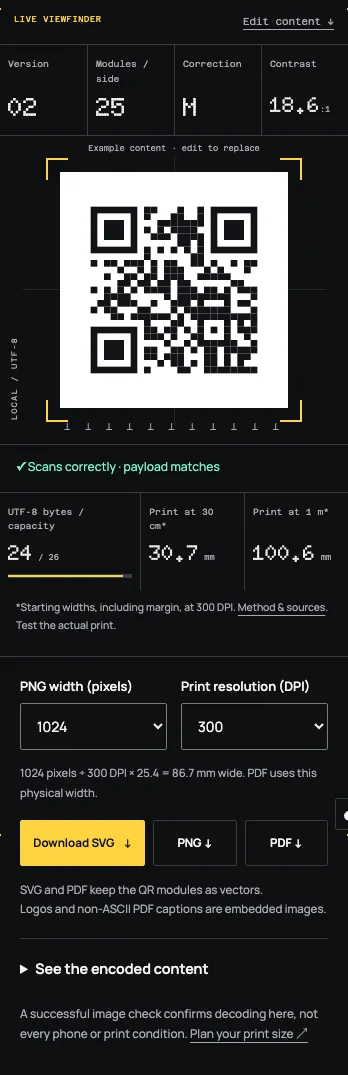
Tidy QR calculates a luminance-based contrast ratio from the chosen foreground and background colors. The calculation follows the familiar W3C relative-luminance method. It helps reveal combinations that are close in brightness even when their hues seem different.
The ratio does not model camera exposure, printer behavior, material texture or glare. It is not a QR-specific pass certificate. A strong numerical ratio is a useful starting condition, while the image decoder and physical proof provide different kinds of evidence.
The interface therefore shows both a contrast warning and the result of decoding the rendered image. Those checks answer different questions. Do not turn either result into an unsupported promise that every phone will scan the design at every size.
A worked design revision
Consider a chosen pale green foreground on a light cream background. The brand palette may look coordinated, but the luminance difference can be small. In the generator, compare the displayed ratio and decoder result with a version using a much darker green foreground.
Keep the payload, size and background unchanged while making that comparison. Changing several inputs at once makes it harder to understand why the result improved. Once the darker version is selected, print it on the intended stock and test the complete artwork.
No success percentage is implied by this example. It demonstrates a controlled design revision: inspect the ratio, inspect the decoded payload, then inspect the physical output. The final choice should satisfy the task rather than merely match a palette sample.
Avoid relying on inversion
Some scanning applications can read light modules on a dark field, but support and conditions vary. A capability observed on one phone does not establish a safe default for public printed material. Dark modules on a light background remain the conservative starting point for this workflow.
Tidy QR's dark site theme does not invert the QR artwork automatically. The interface theme and exported image are separate choices. This prevents a user's system appearance setting from silently changing the print file.
If a project requires a dark visual panel, place a complete light QR tile on that panel. Preserve the quiet zone within the tile and keep decorative edges outside it. That approach can fit the surrounding design without making the code itself depend on inversion.
Printing changes color relationships
Screen colors are emitted light; printed colors depend on ink, material and reflected light. A proof can reveal changes that a browser preview cannot predict. Light ink may be less distinct than expected, and a glossy finish may obscure part of the pattern under overhead lighting.
Use the actual production material when the code is important to the task. A desktop paper proof is useful for checking content and rough geometry, but it does not reproduce a metallic label, curved package or translucent surface.
Ask the production workflow to preserve clean edges and the intended dimensions. Color correction or image effects applied to a whole design can also alter the QR tile. Inspect the final composed output after those adjustments.
Keep decoration outside the critical areas
Branding can live in the frame, surrounding typography and nearby artwork. It does not need to occupy every part of the QR symbol. This gives the design room to feel intentional while retaining a simple readable pattern.
If a logo is used, keep it away from the finder patterns and verify the rendered image. Tidy QR raises error correction for its logo workflow, but that does not compensate for every contrast or placement problem. A logo adds another variable to test.
For constrained spaces, remove decoration before reducing the quiet zone or making the modules smaller. The purpose of the code is to carry the visitor to an action. A visually expressive square that cannot be read does not complete that job.
Preserve a reference version
Save a plain black-on-white version alongside the styled artwork. If a later print or placement fails, the plain version provides a useful comparison. It can help distinguish a color or decoration issue from a payload or destination issue.
Record the selected colors and final physical dimensions with the approved file. Recheck when the printer, material or finish changes. The previous proof establishes the conditions that were tested, not every future variation.
Use the generator's contrast display to make informed choices, then complete the process with a physical scan and destination check. The strongest workflow combines the numerical warning, local decoding and real-world proof without treating any one of them as universal certification.
Compare without changing the payload
Keep a small proof set containing the plain design and the proposed colored design at identical physical dimensions. Use the same payload so the grid version and module arrangement remain comparable. If one sample behaves differently, the color or decorative change becomes a more plausible explanation than it would be in an uncontrolled comparison.
Do not describe the result as a general benchmark for that color. The proof only reflects the tested output, lighting and devices. Another printer or paper stock can change the result even when the digital color values remain unchanged.
If the colored design is difficult to read, choose the plain version or reserve more space before approving production. The brand can remain visible in the caption, frame and surrounding page. Keeping those elements outside the code allows a conservative pattern without making the entire design visually anonymous.
Frequently asked questions
Is the contrast ratio a QR standard?
The displayed calculation is a luminance comparison. It is not a QR-scanning certification threshold.
Does dark mode change my exported code?
No. The site theme and the chosen QR foreground/background are separate.
Can I use brand colors?
Yes, if the resulting pattern remains readable. Favor a dark foreground, solid light background and a tested physical proof.
Sources
Last checked: . Examples are illustrative inputs, not measured results.
- Web Content Accessibility Guidelines 2.2, W3C. Checked 2026-10-29.
- Setting the module size, DENSO WAVE. Checked 2026-10-29.
- Determining the QR code area, DENSO WAVE. Checked 2026-10-29.
- Implementation specifications, checked against source code, Tidy QR. Checked 2026-10-29.