Put the guidance into practice: open the related free tool. Examples use stated inputs and are not measured performance claims.
| Chosen input or sourced rule | Example value | Use |
|---|---|---|
| Expected scan distance | 30 cm | Illustrative project input |
| QR version | 3 | 29 modules across |
| Quiet zone | 4 modules per side | 37 modules across with margin |
| Printer resolution | 300 DPI | Illustrative printer setting |
| Distance starting point | 30 mm | 300 mm divided by 10 |
Measure the situation before the artwork
The useful distance is where a person is likely to hold a phone while scanning. A card held in the hand differs from a window sign behind a counter. Measure the planned setting rather than copying a size from an unrelated example. Account for barriers that prevent visitors from moving closer.
Think about the complete outside square, including the quiet zone. If a designer reserves a space for only the dark pattern, adding the required border later can make the finished artwork larger than expected. If the border is cropped to fit, recognition can suffer instead.
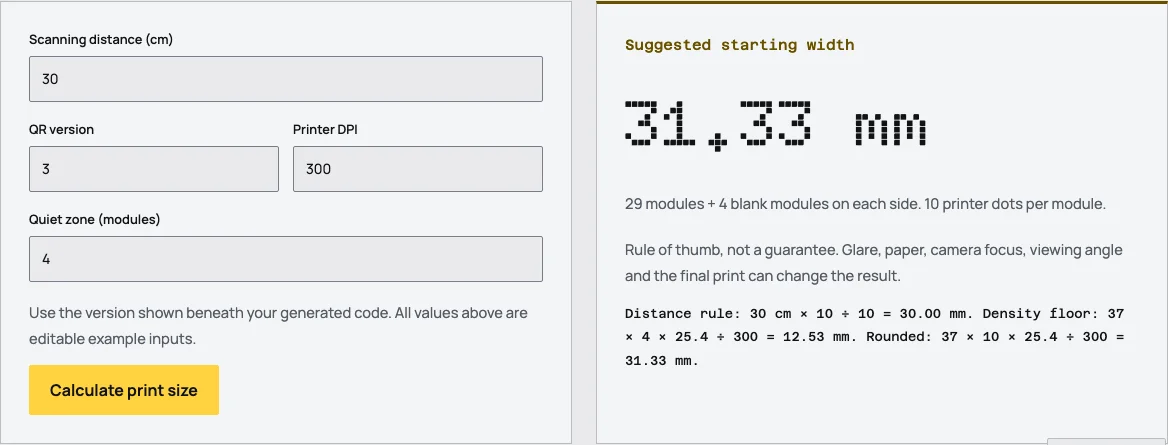
The Tidy QR calculator asks for distance, version, print resolution and margin because those inputs represent different constraints. It does not claim that a single size works for every payload, phone, surface or lighting condition.
Use the distance rule as a starting point
REHAU's QR guidance describes a distance-to-width ratio that can be expressed as scan distance divided by 10. For an illustrative distance of 30 cm, convert to 300 mm and divide by 10 to obtain a starting width of 30 mm. The calculation is easy to reproduce, but it is not a certification of camera performance.
A rule of thumb helps reserve space early in a layout. It cannot capture glare, lens focus, printing quality or the way a sign is mounted. Treat it as the first candidate size to test, especially if the code will be viewed through glass or at an angle.
Do not use a distance formula to justify an unusually dense symbol at a tiny module size. The same outside width can contain very different grids. The density calculation supplies a separate constraint that a simple distance ratio misses.
Density determines the size of each module
A standard version 3 symbol has 29 modules on each side. With a quiet zone of 4 modules on each side, the complete width spans 37 modules. Dividing the chosen outside width by that total gives the physical width of each module.
DENSO WAVE advises allowing sufficient printer dots for each module and illustrates a minimum of 4 dots per module. The calculator uses that guidance to establish a density floor. At a chosen 300 DPI, one printer dot is 25.4 divided by 300 millimeters. Multiplying by the required dots per module and the total module count gives the corresponding minimum geometry.
The calculator then takes the larger of the distance starting point and density floor. It rounds up to a whole number of printer dots per module, helping avoid a theoretical size that asks the printer to render fractional dots. This is a transparent implementation method, not a new QR standard.
Work through the example
Using the selected version 3, margin 4, distance 30 cm and resolution 300 DPI, the distance starting point is 30 mm. Across 37 modules, that asks for approximately 9.58 printer dots per module. Rounding upward to 10 dots gives a finished width of about 31.33 mm.
That final value is computed from the stated inputs. It is not an observed scanning threshold. If the payload grows and the encoder selects a different version, recalculate rather than retaining the old width without checking the new module density.
Print at the actual intended dimensions and compare the result with the source file. A printer dialog that fits artwork to the page can silently change the size. Confirm that surrounding captions and borders remain outside the exported quiet zone.
The material changes the test
Matte paper, a glossy label and a curved container can produce different practical results even with identical geometry. Reflection can obscure modules. A curve can distort the apparent grid. Ink spread can narrow light gaps. The calculator does not model those effects.
Place a proof where the final piece will be used. Test from the expected approach direction and at a comfortable distance. A scan performed with the phone directly over a flat sample on a desk does not represent a sign installed behind reflective glass.
Use representative devices when possible and test the complete destination. A readable image is only useful when the linked page opens and supports the promised action. Include a printed alternative for people who cannot complete the camera route.
Simplify before shrinking
If the code needs more space than the layout allows, inspect the payload first. Remove unnecessary text and use a stable concise destination you control. Avoid an unexplained third-party shortener merely to gain a smaller grid, because that adds another service dependency.
Reduce decorative interference before reducing the quiet zone. A logo or unusual module shape may demand more conservative printing than a plain square code. Return to a simple dark-on-light design if the space is constrained.
If the content truly needs a dense payload, reserve a larger area or change the placement. A print layout should accommodate the information it asks a camera to read. Making the square smaller does not reduce the amount of data inside it.
Keep the approved dimensions with the file
Record the payload, QR version, margin, export format, intended dimensions and proof result together. This makes later resizing or reprinting easier to review. A colleague should not have to infer the approved size from a screenshot in a message thread.
Recheck the code when the payload, design, material or printer changes. Those are changes to the tested conditions. Reusing the same outside dimensions may still be reasonable, but it should follow a fresh inspection rather than an assumption.
Use the calculator to establish a defensible starting point, then let the physical proof answer the practical question. The method is most useful when its limits remain visible.
Use the densest final payload
A layout template may be reused for codes with different content lengths. Do not approve the reserved square using only the shortest sample and assume the rest fit the same conditions. Check the actual selected versions and use the densest representative output for the physical proof.
If the template cannot accommodate that output comfortably, increase the reserved area or simplify the content strategy. Making a separate exception for one dense label can be safer than silently shrinking its modules to match an already fixed design.
Frequently asked questions
Is there a universal minimum QR size?
No single size guarantees scanning across all versions, cameras, materials and distances. Use density and distance inputs, then test a physical proof.
Does the calculator include the border?
Yes. Its finished width includes the chosen quiet zone on both sides of the symbol.
Why is the final value slightly larger than the distance rule?
The calculator rounds up to whole printer dots per module after applying the distance and density constraints.
Sources
Last checked: . Examples are illustrative inputs, not measured results.
- QR Code Guideline, REHAU Brand Management. Checked 2026-10-29.
- Setting the module size, DENSO WAVE. Checked 2026-10-29.
- Determining the QR code area, DENSO WAVE. Checked 2026-10-29.
- QR Code versions and information capacity, DENSO WAVE. Checked 2026-10-29.
- Implementation specifications, checked against source code, Tidy QR. Checked 2026-10-29.
- SI Units: Length, National Institute of Standards and Technology. Checked 2026-10-29.